Skip to content
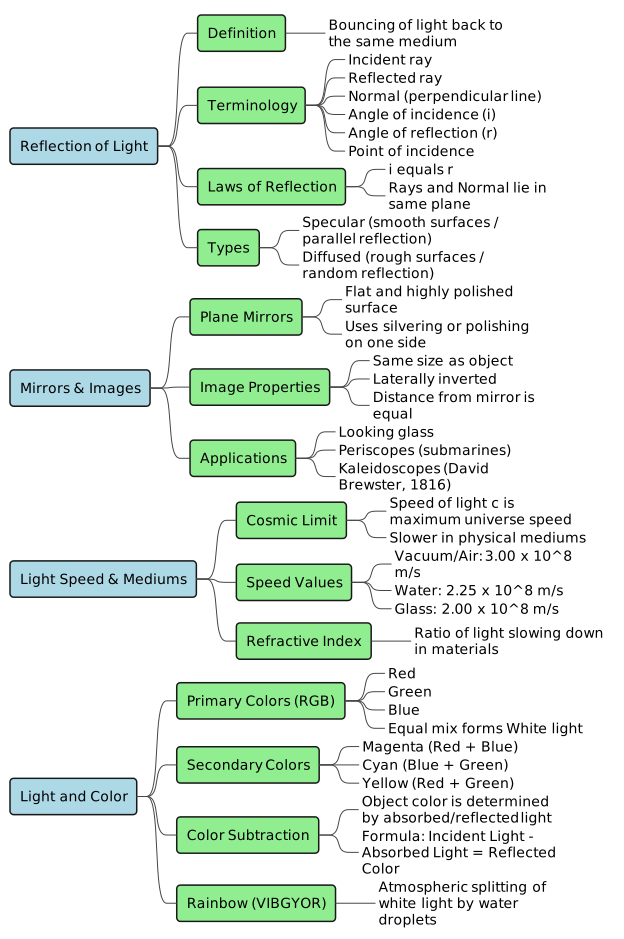
Definition: Reflection is the phenomenon where a ray of light, traveling from one medium, strikes the surface of another medium and bounces back into the same medium.Behavior of Different Objects:Transparent objects (e.g., a thin clear sheet of glass): Allow most light to pass through, reflecting very little.Translucent objects (e.g., a thick sheet of glass, butter paper): Allow some light to pass through and reflect some.Opaque objects: Do not allow light to pass through. They either absorb or reflect most of the light.Black opaque objects: Absorb almost all incident light.Smooth and highly polished surfaces (e.g., mirrors): Reflect almost all incident light.
Incident Ray: The light ray that strikes the reflecting surface.Reflected Ray: The light ray that bounces back into the same medium after striking the surface.Point of Incidence: The specific point on the reflecting surface where the incident ray strikes.Normal: An imaginary perpendicular line drawn to the reflecting surface at the point of incidence.Angle of Incidence (  ): The angle formed between the incident ray and the normal.Angle of Reflection (
  ): The angle formed between the reflected ray and the normal.Plane: The flat surface containing the incident ray, reflected ray, and the normal.
The incident ray, the reflected ray, and the normal at the point of incidence all lie in the same plane.The angle of incidence is always equal to the angle of reflection (  ).
).
Plane Mirror: A flat, highly polished, smooth reflecting surface. It is constructed by polishing or silvering one side of a thin, uniform sheet of glass to make it opaque.Lateral Inversion: The phenomenon where the right side of an object" appears as the left side in its reflected image, and vice versa.Real-world Application: The word “AM”“BULANCE” is written in reverse (3DHAJU8MA) on emergency vehicles so drivers ahead can read it correctly in their" rear-view mirrors.
The image size is exactly equal to the object size.The image is laterally inverted.The distance of the image behind the mirror is equal to the distance of the object in front of the mirror (Object Distance = Image Distance).
As looking glasses or makeup mirrors.In barber shops.Placed on opposite walls of a room to make it look spacious.In scientific laboratories.In solar cookers and solar geysers.To construct optical instruments such as periscopes (used in submarines to view objects above water, and by tank commanders) and kaleidoscopes (used to produce colorful patterns, invented by Sir David Brewster in 1816).
Light travels at a fundamental cosmic speed limit. It takes about 8 minutes for sunlight to reach Earth.Speed in Vacuum/Air: Approximately  (precisely
  ).Theory of Special Relativity: Proposed by Albert Einstein, stating that the speed of light (
  ) is the maximum speed at which any matter in the universe can travel.Refractive Index: The ratio by which light slows down when traveling through transparent mediums.


These are colors that cannot be created by mixing other colors.The three primary colors of light are Red, Green, and Blue (RGB).Mixing all three primary colors of light in equal proportion produces White light.


White Object: Reflects all colors of white light and absorbs none.Black Object: Absorbs all colors of white light and reflects none.Colored Object: Reflects its own color and absorbs all other colors (e.g., a blue object absorbs Red and Green, reflecting only Blue).Illumination Effect: If white paper is illuminated only by red light, it will appear red because only red light is available to reflect.
A natural spectrum of colors formed in the atmosphere when sunlight passes through tiny water droplets acting as prisms.The droplets split white light into its seven constituent colors: Violet, Indigo, Blue, Green, Yellow, Orange, and Red (VIBGYOR).
Example 1: White light (Red + Green + Blue) falls on a shirt that absorbs red light.

The shirt appears Cyan.Example 2: Yellow light (Red + Green) falls on the same shirt (which absorbs red light).
The shirt appears Cyan.Example 2: Yellow light (Red + Green) falls on the same shirt (which absorbs red light).

The shirt appears Green.
The shirt appears Green.
Specular (Regular) Reflection: Occurs when parallel rays of light strike a smooth surface (like a mirror) and reflect as parallel rays.Real-World Glare: Rainwater fills irregularities on roads, turning them into smooth surfaces. This causes specular reflection of oncoming headlights, producing a distracting glare for drivers.Diffused (Irregular) Reflection: Occurs when parallel rays strike a rough surface (like paper, cardboard, or leaves) and reflect at different angles and directions.This type of reflection allows us to see objects from all directions.It is not a failure of the laws of reflection; every individual ray still obeys the law of reflection at its local point of contact.

Share
Explore
 Recap Hub
Prepared by: learnloophq@gmail.com
Chapter: 04. Light
Crash Course Study Material: Light
1. Introduction to Reflection of Light
2. Terms Related to Reflection
3. Laws of Reflection
Light rays reflecting from a surface strictly obey two laws of reflection:
4. Plane Mirrors and Image Formation
Characteristics of an Image Formed by a Plane Mirror:
Uses of Plane Mirrors:
5. Speed of Light
Speed of Light in Various Mediums:
Medium
Speed of Light
Air or Vacuum
Water
Glass
6. Primary and Secondary Colours of Light
White light can be produced by combining three distinct, widely separated frequencies of light.
Primary Colours:
Secondary Colours:
Colors produced by mixing any two primary colors of light are called secondary or composite colors:
7. Appearance of the Colour of an Object
The color of an object is determined by the specific wavelengths of light it reflects and the light source illuminating it.
Formation of a Rainbow:
8. Colour Subtraction
Colour subtraction is the process of determining the color of an object by subtracting the wavelengths of light absorbed by the object from the incident light.
9. Types of Reflection
Want to print your doc?
This is not the way.
This is not the way.
Try clicking the ··· in the right corner or using a keyboard shortcut (
CtrlP
) instead.