Skip to content
Design Toolkit
  • Pages
    • Design Toolkit Introduction
    • Meeting Agenda
    • Selkirk Drawing Stages
      • Drawing Stage One - Concept Art
      • Drawing Stage Two - Presentation Art
      • Drawing Stage Three - Initial Price Estimate
      • Drawing Stage Four - Firm Pricing and Corporate Client Drawings
      • Master Drawings
    • Selkirk Drawing Template
    • Selkirk Library Icons & Specifications
    • Drawing Standards
      • Fascia Signs
      • Channel Letters & Channel Shapes
      • Corporate Clients
      • Photo Overlays
      • Pylon Signs
      • Fuel Canopy
    • Materials
      • ACM / Aluminum Composite Material
      • Acrylic
      • Aluminum
      • Coroplast
      • Expanded PVC
      • Flex Face
      • MDO / Medium Density Overlay
      • Polycarbonate
      • Polystyrene
      • Steel Columns
    • Standard Size Guidelines
      • Channel Letters
      • Painting
      • Router Size Limitations
      • Shipping Guide
      • Thermal Forming / Molding
    • Selkirk Terminology
    • Sign Types
    • Pylon Sign Details
      • Pylon Types & Terminology
      • Pylon Base & Column Details
      • icon picker
        Pylon Cabinet Mounting Options
    • Cabinet & Fascia Details
      • Cabinet Types & Terminology
      • Single Sided Sign Cabinets
      • Double Sided Sign Cabinets
      • EX and SS Sign Extrusions
      • Single Face Illuminated Cabinet Standards
    • Channel Letter Details
      • Front-lit Channel Letter Materials
      • Front-lit Channel Letter Guidelines
      • Halo Lit Channel Letter Materials
      • Halo Lit Channel Letter Guidelines
      • Front and Halo Lit Channel Letter Materials
    • Routed Letter Details
    • Push Through & Routed Face Details
    • Preparing Files for Production
      • Production File Overview
      • Files for Digital Printing
      • Files for Vinyl Plotting
      • Files for CNC Router
      • File Resolution Guidelines
      • File Type Requirements
      • Raster vs. Vector
    • Minimum Survey Requirements
      • Face Replacements for Existing Frames
      • Frame Replacements for Existing Cabinets
      • New Inserts for Existing Two Column Pylon
      • New Columns for Existing Bases
      • New Cabinet for Existing Single Column Pylon
      • New Signage for Gas Canopy
      • Building Signage
      • Printable Quick Reference Guide for Minimum Survey Requirements
    • Signopedia

Pylon Cabinet Mounting Options

Last edited 979 days ago by Adam Doll.

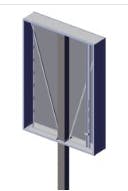
Sleeve Down Pole.jpg

Sleeve Down

A pylon with the cabinets slid vertically onto the column before being secured in place.
The column is not part of the column structure.
The cabinets are built with an internal column pocket so the column can be secured to the cabinet structure. (The column pocket is not shown in the drawing to the left).
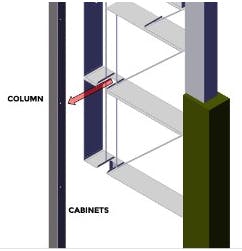
Sleeve On.jpg

Sleeve On

A pylon with cabinets sliding horizontally onto the column, before being secured in place.
It is important to note that the column can not be on the very edge of the cabinet. It should be inset as shown in the drawing to the left.
Column slides into the cabinet’s cutout notch.
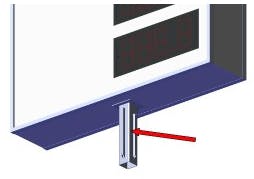
Sleeve In.jpg

Sleeve In

A column that is part of the cabinet, that slides into the column below.
The column is part of the cabinet structure, and extends out the of the bottom.
The column extending out of the cabinet is often referred to as a stub column.
The stub column sleeves into a larger main supporting column from grade.
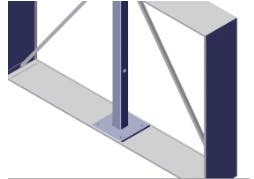
Mate Plate.jpg

Mate Plate

A steel plate, usually at the bottom of a cabinet that attaches to a matching plate at the top of the support column.
The cabinet typically has an internal column to provide structural support.
 
Want to print your doc?
This is not the way.
Try clicking the ⋯ next to your doc name or using a keyboard shortcut (
CtrlP
) instead.