




5 min read
Superhuman Docs MCP in Action
Real ways to put your agent to work inside your docs.
- Standardize hundreds of rows in a single prompt.
- Turn a live table into a ready-to-share update.
- Organize scattered feedback into something you can act on.

What's covered:
- How to clean up tables at scale
- How to turn data into shareable updates
- How to make feedback trackable and actionable

What you'll need:
- Access to Superhuman Docs MCP
- An AI client connected to Superhuman Docs MCP
Where this gets interesting
You’re not just asking questions. You’re shaping your docs, your data, and your workflows in real time. Each workflow below starts with something you already have: a messy table, a stack of notes, or a doc full of comments, and shows exactly what your agent can do with it inside Superhuman Docs. It’s where things go beyond generic AI chat and into your actual work.
New to Superhuman Docs MCP?
1. Run batch updates across your doc
You know the table. The Status column has “Done,” “done ✓,” “DONE,” and “Completed,” and they all mean the same thing. Fixing it row by row has been on your list for weeks. Instead of fixing it manually, ask your agent to clean it up in one pass. Paste your doc URL into your AI client and describe the changes you want to make. Your agent then reads every row and maps each variation to the right value. If it looks right, apply it to the whole table or your entire doc. Rename fields, standardize values, or roll out a rebrand. Hundreds of updates. One prompt. Take it a step further and ask your agent to:- “Replace ‘Customer’ with ‘Client’ across this doc.”
- “Standardize Status across all project tables.”
- “Find anything labeled ‘WIP’ and convert it to ‘In Progress’.”

Work in iterations
For bigger changes, start small. Run it on 10 rows first, check the before-and-after, and adjust your prompt if needed.
2. Turn your table into a weekly update
You track everything. Status updates, owners, priorities, notes. It’s all there. Turning that into something you actually share still takes time. You have to decide what matters, how to structure it, and how to say it. Your agent can tackle that for you. It can read the table in your doc, figure out what’s important, and turn it into a clear update written directly in your doc. And it’s not locked into one format. You can reshape it in that moment. Turn it into a leadership brief, a project update, a Slack summary, or something entirely different. Your 20-minute Monday task is now a single prompt.
Be explicit about scope
Be clear about what should change and what shouldn’t in your prompt. When possible, name the exact page, table, or section, like “only update the Marketing table” or “leave the Project Tracker page alone.”
3. Make sense of scattered feedback
Your doc already captures feedback in ways other tools don’t: inline comments, @mentions, and threaded replies. Your agent can read all of it, group similar ideas, and pull out what people are actually saying, where they agree, where they don’t, and what matters most. It can turn that feedback into a structured table with columns like Theme, Sentiment, Owner, and Status. It’s no longer scattered across your doc; now it's something you can actually track. You can filter it, assign ownership, and build views on top of it, all in the same place where the feedback already lives. You go from collecting feedback to actually using it.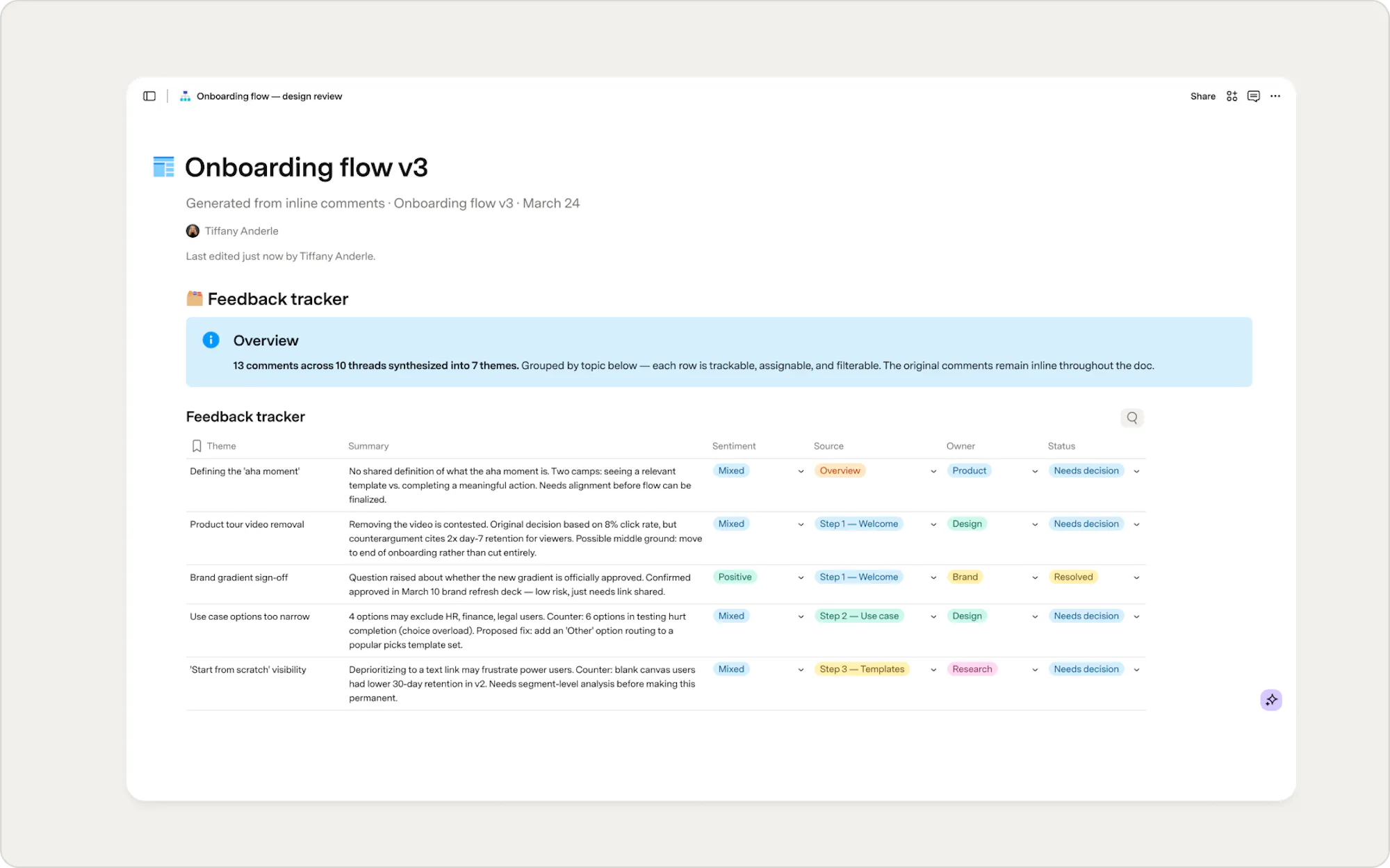
Start with clear context
When you’re working with something specific, share the doc URL. It’s easier than describing it and helps your agent find the right place right away. If your data lives outside of Superhuman Docs bring it in as a screenshot, a CSV file, or a Markdown file. Your agent can read it and add it to your doc.
Now what?
You’ve seen ways your agent can move work forward inside Superhuman Docs. Now, this is where you start to make it your own workflows. Pick one doc you already use and try one of these approaches. Experiment, adjust, and build from there. When something works, reuse it and incorporate it into your workflow. The more you use it, the more it becomes part of how you move work forward.Keep building
- Learn best practices for structuring docs, writing prompts, and creating reliable workflows.
- Explore security recommendations to ensure your agent has the right access and safeguards in place.
- Discover tools and endpoints to extend your agent’s capabilities and connect to external systems.
Was this helpful?
YesNo