Connect to an MCP server
Go only
MCP servers are only supported in Go.
The Model Context Protocol (MCP) offers a standard way to expose resources and tools to LLMs. Many apps are adopting this standard and hosting MCP servers, making it easy for AI tools to interact with their data and features.
Generate a connector
You can get started quickly by generating a connector from the MCP URL.
- Navigate to the Packs page in your Superhuman Docs workspace.
- Click Create an MCP Connector.
- Enter the URL of the MCP server.
- Check the detected settings, and adjust if needed.
- Click Create Connector.
This will create a new Pack, populated with generated code, released and ready to use. You can edit the code in the Pack Studio, or migrate the code to a local project. Later edits need their own build and release before an installed connector picks them up.
Write the connector yourself
Adding an MCP server to a connector takes only a few lines of code: an internal name and the server's URL.
pack.addMCPServer({
  name: "Icons8",
  endpointUrl: "https://mcp.icons8.com/mcp/",
});
Only one MCP server per-connector
A connector is limited to connecting to only a single MCP server. The platform expects each connector to connect to a single external application, and users wishing to work across multiple applications would install multiple connectors.
Compatibility
MCP is a large, rapidly evolving standard, and not all MCP servers are compatible with the platform.
- Hosted servers only - Local MCP servers (installed via
npm, etc) are not supported. - Streamable HTTP transport only - Most MCP servers use the more modern Streamable HTTP transport, but the older and now deprecated HTTP+SSE transport is not supported.
Additionally, not all MCP features are supported by the platform.
- Tools only - Although MCP servers can provide additional types of resources, connectors can only use the tools.
- No streaming support - Connectors must wait for the complete response from the MCP server, and cannot take advantage of streamed responses.
MCP Apps
Go supports the MCP Apps standard, which lets an MCP server return an interactive UI with a tool result. No additional code or configuration is required in your connector to enable this feature.
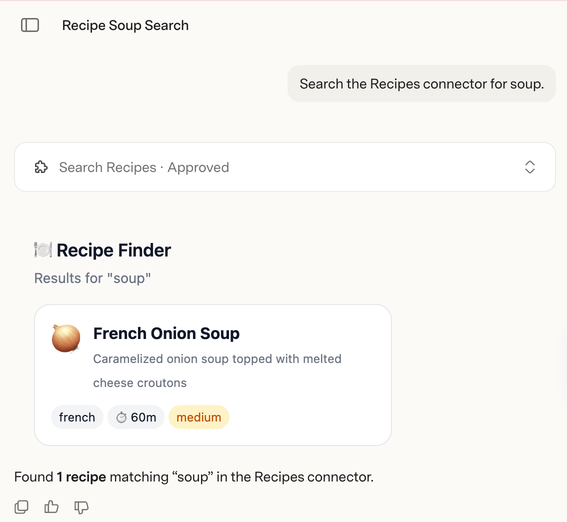
Web client only
MCP Apps are only available in the web client (go.superhuman.com). In other clients (browser extensions and desktop clients) the tool will still function, but the app UI is not shown.
Network access
As with all network traffic, MCP requests go through the Fetcher, and the domains used must be declared in advance. While MCP servers are often hosted on a subdomain, it's a best practice to declare the root domain to allow for future expansion to other endpoints.
pack.addMCPServer({
  name: "Icons8",
  endpointUrl: "https://mcp.icons8.com/mcp/",
});

pack.addNetworkDomain("icons8.com");
Authentication
Requests to MCP servers use the same authentication system as the rest of the platform, supporting common patterns like static tokens or OAuth2. Your code must declare the type of auth used. OAuth (Auto) and OAuth (Manual) in the dialog match the first two examples.
Many MCP servers use OAuth2 with dynamic client registration (DCR).
pack.addMCPServer({
  name: "Example",
  endpointUrl: "https://mcp.example.com/mcp",
});

pack.setUserAuthentication({
  type: sdk.AuthenticationType.OAuth2,
  useDynamicClientRegistration: true,
  useProofKeyForCodeExchange: true,
  scopes: ["read", "write"],
});
For MCP servers that use OAuth2 but don't support DCR, you can manually specify the OAuth URLs in your code. You'll also need to manually register an application in their portal and upload client credentials on the Settings screen of the Pack Studio.
pack.addMCPServer({
  name: "Example",
  endpointUrl: "https://mcp.example.com/mcp",
});

pack.setUserAuthentication({
  type: sdk.AuthenticationType.OAuth2,
  authorizationUrl: "https://example.com/authorize",
  tokenUrl: "https://example.com/token",
  useProofKeyForCodeExchange: true,
  scopes: ["read", "write"],
});
pack.addMCPServer({
  name: "Example",
  endpointUrl: "https://mcp.example.com/mcp",
});

pack.setUserAuthentication({
  type: sdk.AuthenticationType.HeaderBearerToken,
});
pack.addMCPServer({
  name: "Example",
  endpointUrl: "https://mcp.example.com/mcp",
});

pack.setUserAuthentication({
  type: sdk.AuthenticationType.QueryParamToken,
  paramName: "api_key",
});
Same authentication as the REST API is preferred
When possible, configure the connector's authentication to support both the MCP server and the app's REST API (if available). A Pack can only include a single type of authentication, and advanced connector features may require using the app's REST API to implement them.
User confirmation for actions
Go prompts users for confirmation before performing actions that mutate records or have side effects. An MCP tool will be considered such an action if the readOnlyHint annotation on the tool is any value other than true. See the ToolAnnotations type in the MCP specification for more information.
Search tools
To allow
Go's knowledge search feature to connect to an MCP server, list the server's search-related tools in the field searchToolNames. If the server has multiple tools that provide search, include all of them.
pack.addMCPServer({
  name: "Example",
  endpointUrl: "https://mcp.example.com/mcp",
  searchToolNames: ["search_documents", "search_files"],
});
MCP servers can add, remove, or rename tools without warning, so you will need to keep the list in sync with what the server provides. Tool names listed in searchToolNames but not present on the server will be ignored.
List at most 16 search tools per server. Each name can have at most 128 characters.