Update your Packs to work with Superhuman Go
If you've already built a Pack for Superhuman Docs, the good news is that it can also work as a connector in Superhuman Go.
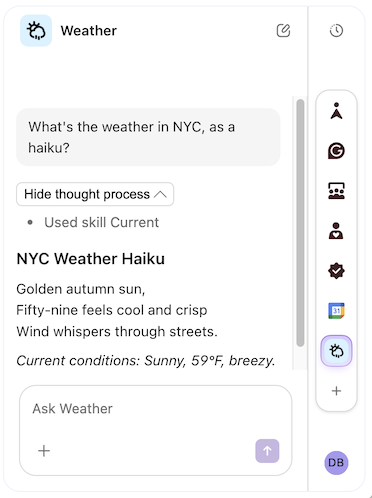
In the screenshot above, you can see a user accessing data from the Weather Pack, which hasn't had any code changes. The LLM knows all the formulas and actions in the Pack, calls them as needed, and displays the results in a human-friendly way.
How well your Pack works in Go can vary, so the main task is to test it there and update it as needed to ensure a great user experience.
Recommended updates
There aren't strict requirements for your Pack to work in Go, but there are common patterns. Below is a list of updates to consider.
Remove doc-specific language
Packs used to only run in Docs, but now they can also run in Go. Update your Pack to remove doc-specific language, including:
-
Building block descriptions
- "Syncs your tasks to your doc"
- "Sync your tasks"
-
Parameter descriptions
- "The time zone of your doc"
- "The current time zone"
Add indexing to your sync tables
The data in your sync tables won't be available in Go unless you index them. You should set up indexing for sync tables that:
- Have at least one free-text column (description, notes, body, etc.)
- Have a link column
See the Indexing guide for more information on adding indexing features to your sync table, and the Testing and monitoring section to verify it worked.
Add skills where appropriate
While can utilize your connector to answer a wide range of user questions and prompts, it may struggle with the more nuanced tasks. In those cases, you should add additional skills to your Pack, providing a custom prompt that better guides the LLM.
See the Skills guide for more information on how to add custom skills.
Adding features for Superhuman Go only
During this process, you may need to adjust your Pack to work better with the LLM. You'll want to avoid breaking the experience for existing users of your Pack, and there are tactics to do so.
Hidden formulas
You can add a new formula just for the LLM to use by adding isExperimental: true to the definition. These won't be displayed to users in docs, but will be made available to the LLM to call.
pack.addFormula({
  name: "GetWorkspaceId",
  description: "Gets the ID of the user's workspace.",
  parameters: [],
  resultType: sdk.ValueType.String,
  // Hide this in docs, but allow the LLM to use it.
  isExperimental: true,
  execute: async function (args, context) {
    // ...
  },
});
LLM instructions
The LLM uses the formula and parameter descriptions to understand how to use them, but sometimes the LLM needs more information to call them reliably. You can provide an alternate description just for the LLM to use by setting the instructions field on the formula or parameter.
pack.addFormula({
  name: "CreateContact",
  description: "Creates a new contact.",
  instructions: `
    Creates a new contact for a given customer.
    The contact should be an individual who works at the company.
    To save the contact information for the business as a whole, use the
    UpdateCustomer formula instead.
  `,
  parameters: [
    sdk.makeParameter({
      type: sdk.ParameterType.String,
      name: "name",
      description: "The name of the contact.",
      instructions: `
        The name of the contact.
        If available, provide the full name (first, middle, and last).
        Don't include prefixes and suffixes (Dr., Esq., etc.).
      `,
    }),
    // ...
  ],
  resultType: sdk.ValueType.String,
  execute: async function (args, context) {
    // ...
  },
});
Alternate suggested parameter values
Since sync tables are limited to 10,000 rows in docs, you may have added parameters for limiting the scope of the sync, perhaps with a suggestedValue that populates a reasonable default. When used in Superhuman Go to index data, however, the sync table can sync many more rows, and it would be better to use a different suggested value that includes a broader scope.
This can be done by setting the field ingestionSuggestedValue on the parameter. This suggested value will only be used in the Superhuman Go setup UI.
pack.addSyncTable({
  name: "Tickets",
  // ...
  formula: {
    // ...
    parameters: [
      sdk.makeParameter({
        type: sdk.ParameterType.DateArray,
        name: "created",
        description: "Include tickets created within the given time range.",
        suggestedValue: sdk.PrecannedDateRange.Last30Days,
        ingestionSuggestedValue: sdk.PrecannedDateRange.Last365Days,
      }),
    ],
    execute: async function (args, context) {
      // ...
    },
  },
});
Source application detection
While uncommon, there may be times when you want to adjust the logic in your code depending on whether it's running in a doc or in Superhuman Go. You can do that by looking at the InvocationSource value in the context.invocationLocation.source.
pack.addFormula({
  name: "SendEmail",
  // ...
  execute: async function (args, context) {
    // ...
    let emailFooter;
    let source = context.invocationLocation.source;
    switch (source) {
      case sdk.InvocationSource.Doc:
        emailFooter = "Sent from Superhuman Docs.";
        break;
      case sdk.InvocationSource.Go:
        emailFooter = "Sent from Superhuman Go.";
        break;
      default:
        throw new Error("Unknown invocation source: " + source);
    }
    // ...
  },
});
Known limitations
Currently, some Pack features don't work in Superhuman Go.
- parameter
autocomplete- The LLM can't see the possible autocomplete values for a parameter. If the list of possible values is small, include them in the parameter description. varargparameters - The LLM can't setvarargparameters. As a workaround, add a hidden formula that uses a JSON string parameter instead.ConnectionRequirement.Optional- If user auth is defined, users will need to sign in before they can use the connector at all.- Two-way sync - Connectors can't edit records using two-way sync. As a workaround, add an action formula that can update a record.