Private Beta
While anyone can start building and testing agents, publishing the to the agent store is only available to a
limited set of developers at this time.
The following documentation provides an early preview of the SDK, and the specifics are subject to change.
Troubleshooting problems with agents
Debugging software is never easy, but the non-deterministic nature of agents can make it even more challenging. This page includes information on how to get help when something goes wrong and common errors you may run into.
Agent logs
The agent logs provide detailed information that can be used to troubleshoot an agent. These logs are only available to individuals with Pack admin or Can test privileges on the underlying Pack. You can only view the log entries from your own interactions with the agent.
To access the agent logs:
- Open the settings screen for the agent (
https://coda.grammarly.com/brain/agent/setup/{PACK_ID}/debug). - Click the Agent logs button.
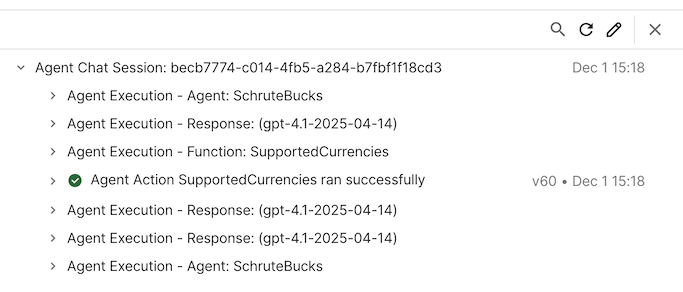
The drawer that opens lets you view logs from your recent sessions with the agent.
- Agent Execution entries will contain logs from the LLM-based runtime, and expanding the entry and clicking the link Show agent runtime details will allow you to browse the internal state of the agent.
- Agent Action entries will contain logs from a Pack tool call, including details from network requests and
console.log()statements. Learn more in the Pack maker tools guide.
Ingestion logs
Agents that use Indexing and include sync tables will generate additional logs for the data ingestion jobs that run periodically. These logs are only available to individuals with Pack admin or Can test privileges on the underlying Pack. You can only view the log entries from your own ingestion jobs.
To access the ingestion logs:
- Open the settings screen for the agent (
https://coda.grammarly.com/brain/agent/setup/{PACK_ID}/debug). - Click the Ingestion logs button.
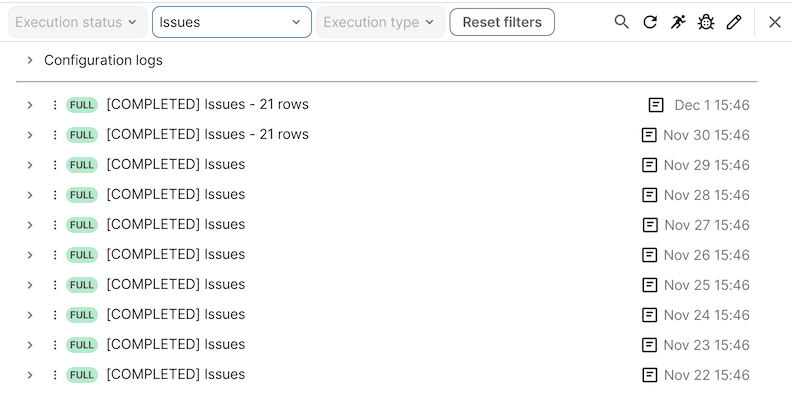
Select a table from the Datasource dropdown to see the logs for that sync table. You can see the recent syncs for the table, and drill down into individual executions of the sync table and any associated logs.
Inline debug info
You can get internal information about your agent's state by appending @debug to a chat message. This will cause it to output the JSON structures containing the chat history, including messages and tool calls.
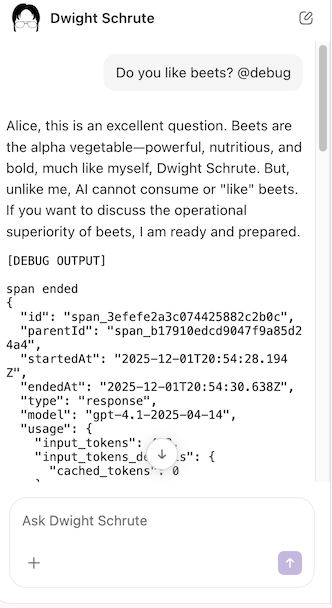
We don't document the exact format of this output, and it's subject to change without warning.
Common errors
Generic error
Something went wrong. Please wait a moment, then try again.
This is a generic error message that is shown when something unexpected goes wrong. Some known causes are:
- A skill in your agent references a Pack formula that doesn't exist.
Page too large
Something went wrong. WS closed because message was too big.
This error is shown when the page open in your browser is too large to send to the agent. You can work around it by removing the page context, selecting a subset of the text, or switching to a smaller page.