Private Beta
While anyone can start building and testing agents, publishing the to the agent store is only available to a
limited set of developers at this time.
The following documentation provides an early preview of the SDK, and the specifics are subject to change.
Shape your agent's chat responses
Users can chat with agents in the Superhuman Go side panel, which is often the primary way to access their features.
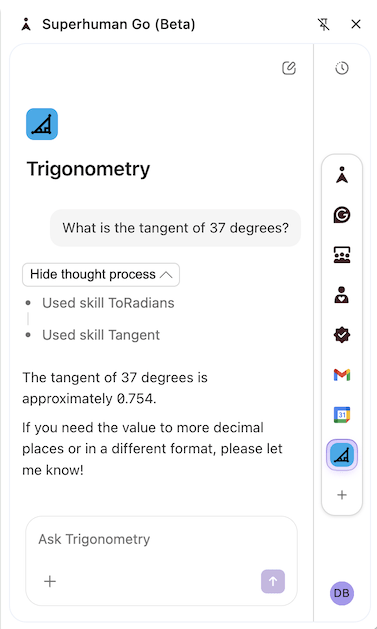
Chat is enabled for all agents, with no code or configuration required. You can customize how your agent responds by defining skills for specific scenarios or overriding the chat skill that all messages are initially routed through.
Formatting
The LLM is instructed to generate chat responses in markdown format, and the chat UI supports a limited subset of the markdown specification. Some differences worth noting are:
- All headings (h1-h6) are rendered the same size.
- Mixing HTML content is not supported (it will be escaped).
- Images are only rendered for tool-sourced URLs. See the Images section below.
Images
Chat replies can include images, which will be automatically scaled to fit the width of the side panel.
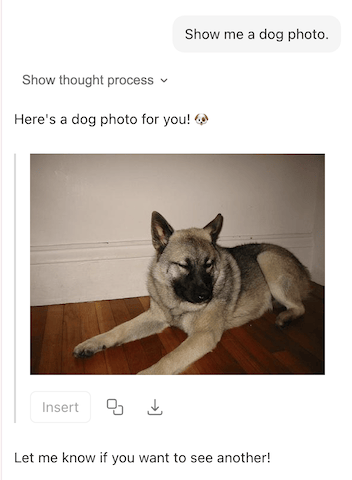
For security reasons, images will only be rendered if the URL is either:
- Returned by a formula and annotated as an image.
- Hosted on one of the declared network domains.
- A data URI (starts with the
data:scheme).
See the sections below to learn more.
Annotated formula result
When using a formula as a tool, ensure any image URLs returned are correctly annotated with either the ImageAttachment or ImageReference hint. This is done by specifying the codaType of the formula or schema property.
import * as coda from "@codahq/packs-sdk";
export const pack = coda.newPack();

pack.addFormula({
  name: "DogPhoto",
  description: "Gets a random photo of a dog.",
  parameters: [],
  resultType: coda.ValueType.String,
  codaType: coda.ValueHintType.ImageReference,
  cacheTtlSecs: 0,
  execute: async function (args, context) {
    let response = await context.fetcher.fetch({
      method: "GET",
      url: "https://dog.ceo/api/breeds/image/random",
      cacheTtlSecs: 0,
    });
    return response.body.message;
  },
});
import * as coda from "@codahq/packs-sdk";
export const pack = coda.newPack();

const PokemonSchema = coda.makeObjectSchema({
  properties: {
    name: { type: coda.ValueType.String },
    sprite: {
      type: coda.ValueType.String,
      codaType: coda.ValueHintType.ImageReference,
    },
  },
  displayProperty: "name",
});

pack.addFormula({
  name: "Pokemon",
  description: "Gets information about a Pokemon.",
  parameters: [
    coda.makeParameter({
      type: coda.ParameterType.String,
      name: "nameOrId",
      description: "The name or ID of the Pokemon to lookup.",
    }),
  ],
  resultType: coda.ValueType.Object,
  schema: PokemonSchema,
  execute: async function (args, context) {
    let [nameOrId] = args;
    let response = await context.fetcher.fetch({
      method: "GET",
      url: `https://pokeapi.co/api/v2/pokemon/${nameOrId}`,
    });
    let data = response.body;
    return {
      ...data,
      sprite: data.sprites.front_default,
    };
  },
});
Images scanned and served by Superhuman
Images annotated this way will not be served directly; instead, they will be uploaded to Superhuman's CDN. As part of that process, they will undergo a security scan and may be rejected if deemed dangerous.
Matching network domain
There are times when it isn't possible to annotate images in tool responses:
- A formula is returning image URLs embedded in either
HtmlorMarkdowntext. - An MCP tool is returning an image.
In these cases, you'll need to ensure that the domain of the image matches one of the declared network domains, or is a subdomain of one of them.
Some apps host images on a CDN at a separate domain; in that case, you'll need to declare multiple domains, which requires approval. If your agent uses authentication, you'll also need to specify which domains to send credentials to via the networkDomain field.
import * as coda from "@codahq/packs-sdk";
export const pack = coda.newPack();

pack.addMCPServer({
  name: "GitHub",
  endpointUrl: "https://api.githubcopilot.com/mcp/",
});

// Register the domain where the MCP server is hosted.
pack.addNetworkDomain("githubcopilot.com");

// Register additional domains where images are hosted.
pack.addNetworkDomain("github.com");
pack.addNetworkDomain("githubusercontent.com");

pack.setUserAuthentication({
  type: coda.AuthenticationType.HeaderBearerToken,
  instructionsUrl: "https://github.com/settings/tokens",
  // Only send credentials to the MCP server.
  networkDomain: ["githubcopilot.com"]
});
Data URI
Images that aren't hosted on the web but are embedded in the image URL can be displayed without additional configuration. These URLs start with the data: scheme, and typically contain the image as a base64-encoded string.
data:image/svg+xml;base64,PHN2ZyB2aWV3Qm94PSIwIDAgMTAwIDEwMCIgeG1sbnM9Imh0dHA6Ly93d3cudzMub3JnLzIwMDAvc3ZnIj48Y2lyY2xlIGN4PSI1MCIgY3k9IjUwIiByPSI1MCIgLz48L3N2Zz4=
Suggested action buttons
While a chat box allows for very flexible interactions, it requires the user to know what to ask for and spend time typing. You can optimize the user experience of your agent by adding suggested actions, which show up in the chat as buttons the user can click.
When a user clicks on an action, it sends the associated prompt to the agent, as if they typed it in the chat box. There are two types of suggested actions, initial and follow-up, as described in the sections below. Both types currently have a limit of showing at most three (3) actions.
Initial actions
When the user starts a new chat with the agent, you can show them a static set of initial actions. These can be used to advertise the most common use cases for the agent and allow users to kick them off quickly.
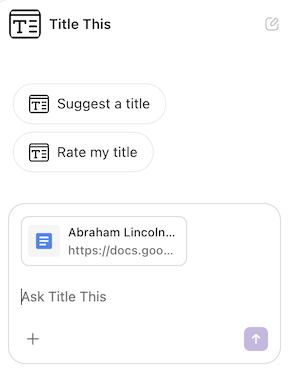
These initial actions are defined in the Pack code using the addSuggestedPrompt() method.
pack.addSuggestedPrompt({
  name: "CreatePost",
  displayName: "Create a social post",
  prompt: `Create a social post based off of my writing.`,
});
Overridden by bench initialization skill
If your agent includes a bench initialization skill, when that skill is triggered its output will be shown instead of the initial actions configured. It may still make sense to include both features in your agent, since the bench initialization skill only runs the first time the user clicks on the agent, and the initial actions will show up for every new chat.
Follow-up actions
When your agent replies to a user, in addition to the message it can also include a set of follow-up actions the user may want to take. Unlike the initial actions, these are generated by the LLM and so can include the context from the conversation, the user's screen, etc.
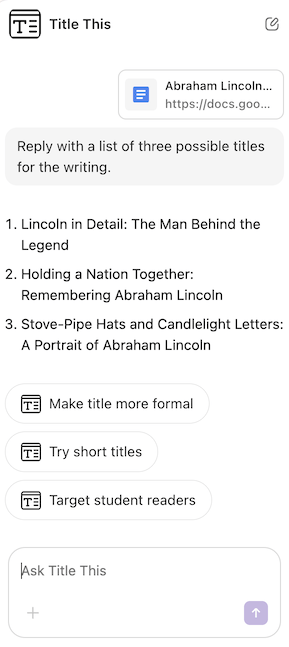
Follow-up actions are enabled by default on all agents, and the LLM will often attempt to populate them even without any instructions to do so. To influence the actions that are suggested, provide instructions to the LLM in the prompt of your skills.
pack.addSkill({
  name: "GeneratePost",
  displayName: "Generate social post",
  description: "Generate a social post based on the user's writing.",
  prompt: `
    Create a short, attention grabbing social post based on the user's writing.
    It should be no more than 280 characters long, and placed in a copyable block.

    Generate structured suggested prompts for tailoring the platform to specific social networks.
    Don't include the suggested prompts in the message.
  `,
  tools: [],
});
Refer to them as suggested prompts
Follow-up suggested actions are currently exposed to the LLM as suggestedPrompts, so it can be helpful to refer to them using that language in your prompts.
It's not possible to disable follow-up actions completely, but you can similarly instruct the LLM not to generate them in the prompt of your skills. You'll need to include this guidance in the chat skill and any other skills in your agent.
pack.setChatSkill({
  name: "Chat",
  displayName: "Chat",
  description: "The chat skill.",
  prompt: `
    Never generate structured suggested prompts.
  `,
  tools: [],
});